Online Shop.
The Online Shop application enables you to sell products or services online and process transactions securely.
Online Shop Examples.
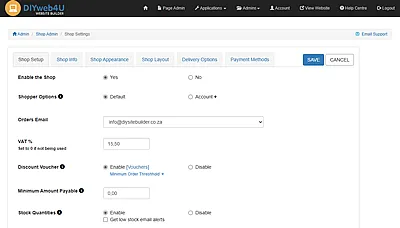
Shop Settings.
- Shop Setup: Enable/Disable the Shop, Shopper Options (Default/Account/Allow Guest Shopper), Set Orders Email Address, VAT % and activation, Discount Voucher (Enable, Disable, Set minimum order threshold), Minimum Amount Payable, Stock Quantities (Enable/Disable, Get 'Low Stock' email alerts).
- Shop Info: Shop Title, Shop Description, Shop Info/Message.
- Shop Appearance: Intro Banner Image, Banner Style (None, Rounded Corners, Border, Drop Shadow, Circle, Border with Drop Shadow), Shop Product Animation on Scroll (Fade, Flip, Zoom), Shop Search Bar, Footer Contact Section.
- Shop Layout: Category Buttons (One Button per Row, Two Buttons per Row), Category Order, Product Listing Style (Portrait, Landscape), Products Per Page.
- Delivery Options: Delivery Options and Courier Integrations.
- None (With optional: Require address at checkout, Delivery Receipt).
- Custom (Add Delivery Options, allow Free Delivery, and/or to Collect, Delivery Receipt).
- Bob Go (Courier door-to-door: The Courier Guy, RAM, Internet Express, SkyNet, Fastway. Pickup points: Bob Box, Pargo. On demand collections: WumDrop).
- The Courier Guy.
- Pudo.
- Payment Methods: Pay on Invoice, Direct EFT, Payfast, Yoco, Payflex, PayShap.
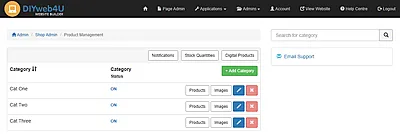
Product Management.
- Categories: Category Name, Category Description, Display Products (Alphabetically, Product Id, Most Recent Edit), Show Page Numbers, (None, Top, Bottom, Top & Bottom), Switch Category On/Off.
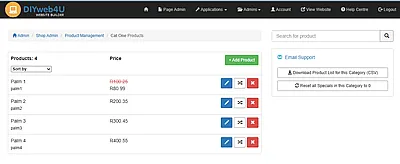
- Products List: Number of products, Price, Show in other Categories, Move Product to another Category, Download Product List, Reset Category Specials.
- Images: Upload product images per category.
- Notifications: View 'Get Notified When Back in Stock' requests.
- Stock Quantities: If enabled, manage product stock quantity totals, Download/Upload Stock Quantity List.
- Digital Products: Manage files made available to buyers for download.
Products.
- Product Details: Code, Name, Description, Image, Price.
- Optional Info:
- Availability Default, Pre-order, Out of Stock,
- Stock Quantity with optional Show stock quantity in shop,
- Variants Size, Colour, Model, Volume, etc., optional Additional Cost per variant,
- Condition New, Refurbished, Used,
- Add a Note Made to Order, Cut to Order, Coming Soon, etc,
- Info Sections Two additional info sections available per product.
- Promote Product: Special Price, Add Product to Shop Showcase.
- Specifications: Product Weight, Package Dimensions (Optional - Enabled in Bob Go, The Courier Guy or Pudo integration).
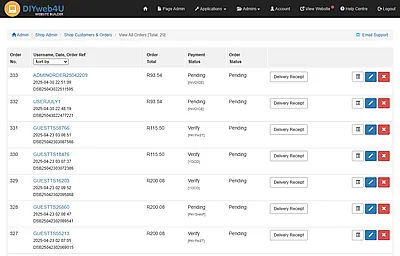
Customers & Orders.
Applicable if 'Shopper Option Account' is selected in Shop Setup.
- View by Customer: Customer Total, Download Customer List, Edit Customer Details, Delete Customer.
- View by Orders: Order No, Customer Name, Date, Order Ref, Order Total, Order Status, Delivery Receipt.
- Order Management:
- View Order Order Details, Print Order.
- Manage Order
- Payment Status (Update Payment Status options),
- Courier selected at checkout (Manage & Submit Shipment/Packages to Courier),
- Order Status (Update Order Status options).
- Delete Order.
Shop Orders Via Admin Panel.
- Shop owner can place orders on behalf of a customer.
Shop Showcase.
- Showcase Title, Showcase Description, Display Products (Alphabetically, Product Order, Most Recent Edit), Showcase Preview (Options to Display on the Shop Front page and/or on the Website Home page), Switch On/Off.
Shop Specials.
- Specials Title, Specials Description, Display Products (Alphabetically, Product Order, Most Recent Edit), Specials Preview (Options to Display on the Shop Front page and/or on the Website Home page), Switch On/Off .


